
Tesla Recall Search by VIN | ChassisVIN
Check Tesla recalls using your VIN. Find detailed recall information, instructions, and a complete recall list by VIN to ensure your vehicle is safe and up-to-date.
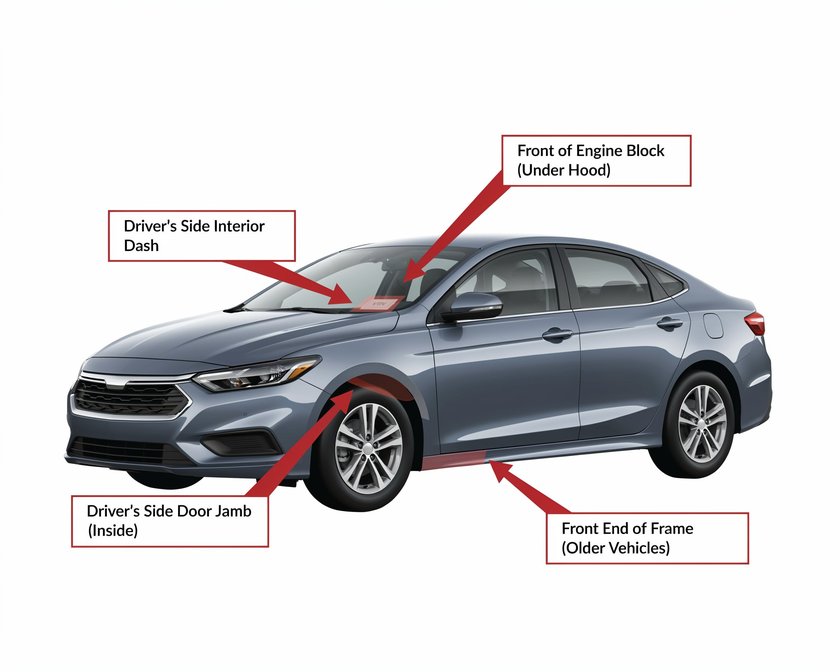
What is Tesla Recall Search by VIN?
The Tesla Recall Search by VIN tool allows you to easily check if your Tesla vehicle is part of any active recall. By inputting your Vehicle Identification Number (VIN), you can instantly access detailed recall information and ensure that your car remains safe to drive.
Understanding the recall status of your vehicle is crucial for maintaining safety, performance, and compliance with the latest automotive regulations. Here’s how you can perform a quick and reliable Tesla recall check:
- Enter your Tesla VIN number
- Get detailed recall list by VIN
- Access important instructions and updates
Why Should I Run a Tesla Recall Check?
Running a Tesla recall check is an essential step for any Tesla owner. By regularly checking for recalls, you ensure that your vehicle is safe to drive and free from any known defects that could lead to accidents or further damage.
Recalls often address critical safety issues, like faulty brakes or malfunctioning airbags, which can put you and your passengers at risk. Performing a recall check gives you peace of mind and helps you avoid potential complications.
Tesla Recall Lookup by License Plate or VIN
In addition to checking recalls by VIN, you can also search for Tesla recalls using your vehicle's license plate number. This is a quick and convenient way to verify whether your car is on the recall list. However, VIN-based recall searches provide more detailed and precise results, especially if you want to know exactly what parts or systems are affected by the recall.
To perform a Tesla recall lookup, you can either enter your VIN or license plate number in our search tool, and you will receive detailed results about any outstanding recalls for your vehicle.
How to Check if Your Tesla is on a Recall List
Checking if your Tesla is on a recall list is simple and can be done through our VIN search tool. To verify your vehicle's recall status:
- Enter your VIN or license plate number in the provided search box.
- Review the recall results, which will include any active or past recalls for your specific model.
- If any recalls are found, follow the instructions provided to schedule repairs or take other necessary actions.
Our tool ensures that you have the most up-to-date information directly from the National Highway Traffic Safety Administration (NHTSA) and Tesla.
Tesla Recall List by VIN
Once you’ve conducted a Tesla Recall Search by VIN, you’ll be presented with a complete recall list, detailing all active and past recalls for your vehicle. This list will include critical information such as:
- Recall reason
- Affected parts
- Repair instructions
- Recall dates
Accessing the Tesla recall list by VIN ensures you stay on top of any necessary repairs and maintain the safety of your car.
Common Auto Recalls and Their Impact
Auto recalls can range from minor issues like software bugs to severe defects that affect vehicle safety. Some of the most common Tesla recalls include:
- Battery management system issues
- Defective airbags
- Power steering failures
Understanding the impact of these recalls is crucial for Tesla owners. For example, a battery-related recall can cause severe driving risks, and a malfunctioning airbag can be life-threatening in an accident.
How to Take Action After Receiving a Recall Notice
If your Tesla is part of a recall, it's important to take immediate action. Tesla will typically send out recall notifications, but it's always a good idea to regularly check your vehicle's recall status. Here are the steps to take:
- Contact Tesla service centers to schedule repairs
- Follow all manufacturer instructions for vehicle handling
- Ensure the repair is free of charge, as recalls are typically covered by the manufacturer
Decode Your Tesla VIN Free
Instant results. No signup required.
Decode a Tesla VIN
Pull the real history behind any car — recalls, title brands, odometer trail.
Tesla VIN Decoder FAQ
Related Guides

Car Battery Lifespan: How Long Do Car Batteries Last? - ChassisVIN
Understand car battery lifespan. Discover the factors that impact it. Get tips to extend your battery's life and how to get a vehicle history report.

VIN Country Codes: Decoding Your Vehicle's Origin | ChassisVIN
Discover the VIN country codes. Learn how to identify where your car was made. Get a detailed guide to vehicle manufacturing origins and VIN structure.

Best SUVs with Captain Seats: Top 2024 Models | ChassisVin.com
Discover the best SUVs with captain seats in 2024. Get detailed reviews, comparisons, and find the perfect family SUV with extra comfort. Search your VIN now!
Checking Car Ownership by VIN | Find Vehicle Owner Information
Need to check car ownership by VIN? Get detailed owner information, vehicle history reports, and more. Verify ownership and protect yourself. Visit ChassisVin.com now!

Chassis Number vs. VIN: What's the Difference? [Explained]
Confused about chassis numbers and VINs? This guide explains the difference, where to find them, and their importance. Get your vehicle history report today!

Car Dashboard Warning Lights Guide: What Do Those Symbols Mean?
Decipher your car's dashboard warning lights with our comprehensive guide. Learn about various car warning light symbols and what actions to take.
Vehicle Recalls by Make
Ready to Decode Your VIN?
Get instant results, completely free. No account needed.